

“57% of rapes occur while on a date. Stay in touch with your tribe. ”
Personal Safety Apps to Keep You Safe
Your phone probably goes everywhere you do. It knows where you are, connects you with the people you trust and, when properly set up, may be able to summon help within seconds. That makes it one of the most useful personal safety tools you already own.
Personal safety apps can provide everything from GPS location sharing and timed check-ins to discreet SOS alerts, emergency recording and professional monitoring. Some smartphones now have many of these capabilities built directly into their operating systems, while dedicated safety apps offer additional features for specific situations.
The important thing to remember is that no app can guarantee your safety. Phones can lose service, batteries can die and you may not always be able to reach your device during an emergency. Think of personal safety technology as one layer of protection that works alongside situational awareness, a safety plan and other self-defense options.
Here are several personal safety apps and smartphone features worth knowing about.
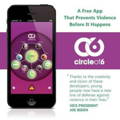
⭐Circle of 6 App⭐
⭐Pan!cGuard & Hollieguard⭐
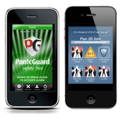
Panic Guard was designed to turn a smartphone into a personal alarm and emergency communication tool. One of its standout features was the ability to trigger an alert by shaking the phone, which could be much easier than trying to navigate menus during a stressful situation.
The technology behind Panic Guard has evolved. Panic Guard now provides safety technology and powers HollieGuard, a personal safety app designed for individual users.
HollieGuard offers features designed to help users raise an alarm and share important information during potentially dangerous situations. Depending on the service and settings being used, features can include location sharing, journey monitoring, emergency contacts and audio or video recording.
Journey-monitoring features can be particularly useful when you're walking home alone, traveling through an unfamiliar area or going somewhere where you'd simply feel better knowing another person can monitor your progress.
As with any safety app, familiarize yourself with exactly what happens when you trigger an alert. Know who receives it, what information they receive and whether emergency services are contacted automatically or someone else must make that call.
Available for iPhone and Android, this app is free and by far, the one that I preferred during my research. Panic Guard Ltd. has several different apps available in the Google Play and iTunes so be sure to check out all their options..
⭐Apple Check In and Emergency SOS⭐
If you have an iPhone, you may already be carrying several personal safety features without realizing how much they can do.
Apple's Check In feature allows you to let a trusted person know that you've arrived safely at your destination. It can be useful when you're driving home late, walking back to your dorm, leaving a date or traveling somewhere alone.
Check In can also be used for a specified period rather than a destination. That's useful when you're going for a run, meeting someone new or doing something where you'd like another person to know if you don't check back in as expected.
iPhones also include Emergency SOS and the ability to establish emergency contacts and Medical ID information.
Take the time to learn how Emergency SOS works on your particular iPhone. You don't want the first time you try to activate an emergency feature to be during an actual emergency.
“Leverage technology to your advantage with a safety app.”

⭐Google Personal Safety⭐
Google offers a collection of personal safety features on supported Android devices, particularly Pixel phones.
Depending on the device, location and available services, these can include Emergency SOS, Safety Check, Emergency Sharing, emergency recording, crisis alerts and car crash detection.
Safety Check is especially useful for everyday personal safety.
You can schedule a safety check for a particular period of time when you're walking alone, exercising, traveling or attending an event. If you don't respond when the check occurs, information can be shared with your selected emergency contacts.
Emergency Sharing can also allow trusted contacts to receive your real-time location when you need someone to know exactly where you are.
⭐Noonlight⭐
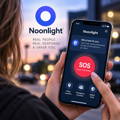
Noonlight adds an important option to personal safety technology: professional emergency monitoring. That's different from an app that simply sends a text or notification to a friend.
Depending on the service being used, an alert can connect you with trained monitoring personnel who can assess the situation and contact emergency services when appropriate.
That can be valuable when you're in a situation where making an obvious 911 call may be difficult or unsafe.
When comparing personal safety apps, always determine who receives your emergency alert. An SOS button that notifies your roommate is not the same thing as a monitored service capable of requesting emergency assistance on your behalf.
Both can be useful. You just need to know which type of protection you're relying on.
⭐Life360⭐
Life360 is widely known for family location sharing, but its features can also be useful among trusted friends, couples and college roommates.
Users can create Circles and share location information with selected people. Its safety features include SOS functionality, while certain membership options provide additional emergency services.
For example, a group of college roommates could use location sharing when everyone is going different places for the evening. Instead of relying entirely on someone remembering to send an "I'm home" text late at night, trusted friends can have another way of looking out for one another.
There is an important privacy consideration with any location-sharing service. Only share your continuous location with people you genuinely trust, understand who can see it and periodically review your settings.
⭐Citizen⭐
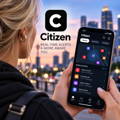
Citizen approaches personal safety from another direction: helping you know what's happening around you.
The app provides alerts about reported incidents and emergencies in supported areas. If there's significant police activity, a fire or another emergency nearby, having that information may give you an opportunity to change your route and avoid the situation.
That's an important part of personal safety because avoiding trouble is always preferable to having to respond after you're already in the middle of it.
Use incident alerts for awareness, not curiosity. If an app tells you something dangerous is happening nearby, move away from the area rather than heading toward it to see what's happening.
⭐Don't Overlook Simple Location Sharing⭐
You don't necessarily need a dedicated safety app for every situation.
Temporary location sharing can be extremely useful when you're going on a first date, using a rideshare, hiking, traveling, attending a large event or meeting someone you don't know well.
But simply sharing your location isn't a complete safety plan.
Choose someone who will actually notice if something is wrong and tell that person what you expect. For example, let a friend know where you're going, when you expect to be home and what she should do if you don't check in and she can't reach you.
Technology becomes much more useful when the people on the other end know exactly what they're supposed to do.
⭐Set Up Your Phone Before You Need It⭐
Don't wait until you're frightened or in danger to figure out how your safety features work.
Add or update your emergency contacts. Check your location permissions. Learn the shortcut for Emergency SOS. Test your safety apps. Make sure your trusted contacts understand what an alert from you means.
If you're a college student, save your campus police or security number and find out whether your school offers a safety app, emergency notification system or nighttime escort service.
Then think about what happens if your phone isn't available.
A dead battery, poor cellular service, damaged phone or someone taking your device can instantly remove that layer of protection. That's why your entire personal safety plan shouldn't live inside your phone.
⭐Personal Safety Works Best in Layers⭐
Your smartphone can be an incredibly useful safety tool, but it isn't a shield.
Situational awareness gives you one layer of protection. Staying connected with trusted people provides another. Safety apps and emergency smartphone features add another. Depending on what's legal and appropriate for you, a personal alarm, pepper spray, stun gun or self-defense keychain can provide an additional option when you need to respond immediately.
No single product, app or technique can guarantee your safety. Take this self-defense readiness quiz to evaluate your preparedness.
Spend a few minutes today exploring the safety features already on your phone. Update your emergency contacts. Practice sharing your location. Learn how to activate Emergency SOS. If you choose a personal safety app, test it before relying on it.
The best personal safety technology isn't necessarily the app with the longest list of features. It's the one you understand, have set up correctly and can actually use when seconds matter.
Copyright©2026 All rights reserved. This article or any portion thereof may not be reproduced or used in any manner whatsoever without the express written permission of Defense Divas®.